Showing posts with label AD. Show all posts

Thursday, October 8, 2020

UltiPro Sync User Attributes to Active Directory (CSV Method)

[NOTICE]
This is a completely valid method but not how we do it today. We use the Report-as-a-Service API to get more granular about the data we extract. It's a little more complex because it uses session logic vs. the simple logon approach used below. Both have their merits. But the RaaS option will certainly run much faster on large data sets. Please check out the next blog post for more info to compare your options.

Objective

Sync user attributes between UltiPro and Active Dirctory. Many of the values originate with HR. Items like Title, Department, EmployeeID and so on.

UltiPro has a relatively well documented taxonomy for their webservices / REST APIs.
https://connect.ultipro.com/documentation#/api/

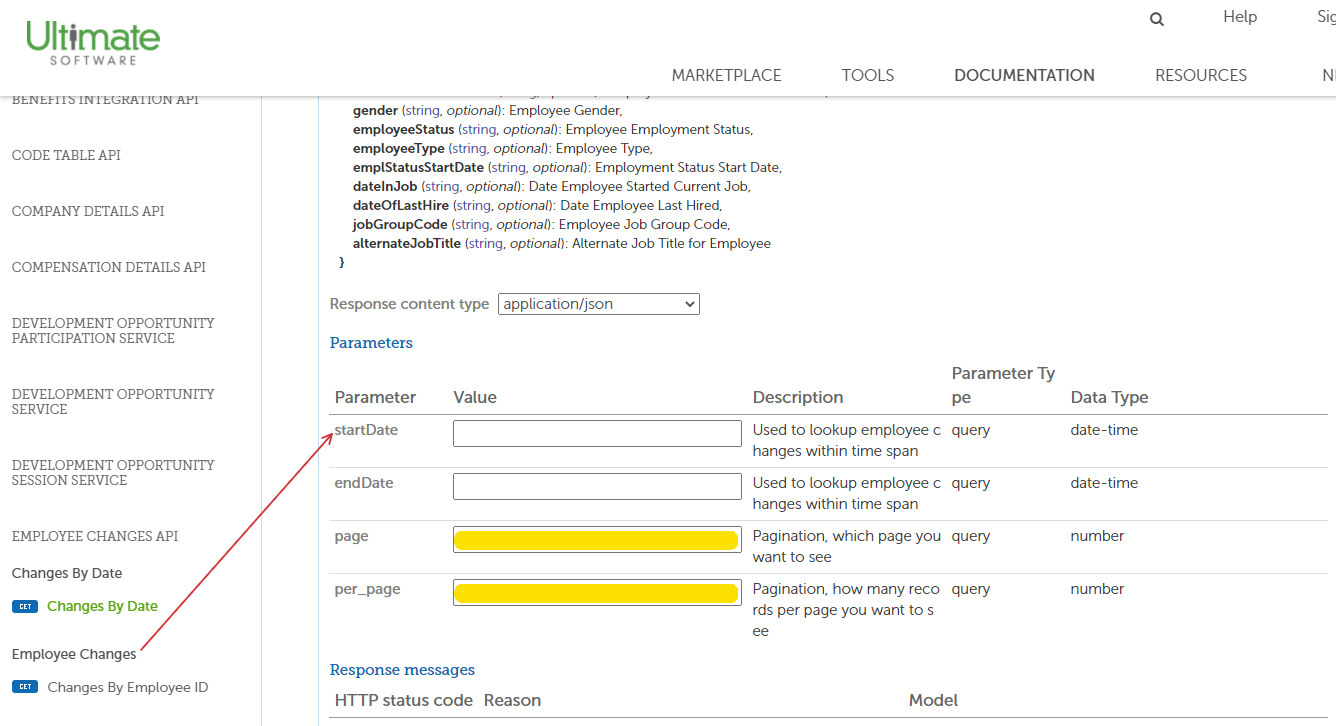
It isn't the most intuitive page but you can find the model for each API mid-page. If the API accepts query parameters they'll be spelled out at the bottom. (see below)



Method
  1. Use existing PowerShell skills to create scripting to pull/parse UltiPro web services data
  2. Use Azure Automation to:
    1. Secure the credentials for the Web Service Account
    2. Control the job schedules
    3. Connect to on-prem resources through Hybrid Worker
  3. Create output that can be digested by sync tools like ManageEngine ADManager

Requirements
  • Web Service Account with API Access. We used the following APIs with View-Only access.
    • Employee Changes
    • Employement Details
    • Org Levels
  • Customer API Key
  • Customer tenant URL (varies slightly based on where you're hosted)

Before we get started...

Other Noteworthy Items
  • ManageEngine does have a native integration --- HOWEVER, they require permission to APIs that include SSN and such. We opted not to use their API to keep the HR data as secure as possible.
  • There are pagination limits in the APIs (this is common for REST). This is highlighted in the script.
  • Any of this can be accomplished with Task Scheduler and cred keys. Azure just makes it a little easier and does a nice job logging.
  • This does take time to process. Depending on the size of your organization, it could take quite a while. Ours takes about 20-30 minutes. This is due to some of the cross references between the different APIs being processed in memory.


Create a Credential
In your Automation Account > Credentials, add a credential for the Web Service API User


Create an Azure Runbook
I'm not going to go into great detail but this is just a generic PowerShell Runbook. Copy the script above into the runbook.


Schedule the Runbook Job
Set a reasonable schedule to allow time for it to finish but not so frequent that no updates are likely to be there or you get flagged for hammering the API. We set ours to 4 hours.


Add the Script to your Runbook

Replace these lines as appropriate:

Credentials
$webserviceaccount = Get-AutomationPSCredential -Name 'UltiPro Sync User'
$ADManagerRunAsAccount = Get-AutomationPSCredential -Name 'ADManager Runas Account'

Your Customer API Key #####
$headers =  @{'us-customer-api-key' = '#####'}

Your export file path
$exportpath = "\\FILEPATHHERE\UltiPro-User-Data"


$webserviceaccount = Get-AutomationPSCredential -Name 'UltiPro Sync User'
$ADManagerRunAsAccount = Get-AutomationPSCredential -Name 'ADManager Runas Account'

$exportpath = "\\FILEPATHHERE\UltiPro-User-Data"
$exportFile = '\Employee-Data.csv'
$headers =  @{'us-customer-api-key' = '#####'}

###########################################
#GET ACTIVE EMPLOYEES FROM ULTIPRO APIS
###########################################
#Collecting all active UltiPro users, 200 at a time. They do not support more than that through the API in one request.
#https://connect.ultipro.com/documentation#/api/817/Employment%20Details/get__personnel_v1_employment-details

write-Output "Searching Employment Details API for active employees"

$a=0
$employees = @()
$AgeObjCount = ""

do {
    $a++
    $tempObj = $null
    $URL = "https://service5.ultipro.com/personnel/v1/employment-details?employeeStatusCode!=T&primaryProjectCode=COMPUTER&per_page=200&page=$a"
    $tempObj = Invoke-RestMethod -Method 'Get' -Uri $url -Credential $webserviceaccount -headers $headers
    
    If ($tempObj.Count -ne 0)
    {$employees += $tempObj}

    else
    {$AgeObjCount = "end"}

} until ($AgeObjCount -eq "end")

$count = $employees.count

write-Output "Found $count employees"

###########################################################
#GET ORG LEVEL DETAILS FROM ULTIPRO APIS
###########################################################
#Org level description is not part of the normal employee details
#This lookup pulls the descriptions for later usage as "Department Name"
#https://connect.ultipro.com/documentation#/api/136

write-Output "Searching Org Level Details API for Company / Department Info"

#$OrgLevels = @()

$URL = "https://service5.ultipro.com/configuration/v1/org-levels"
$OrgLevels = Invoke-RestMethod -Method 'Get' -Uri $url -Credential $webserviceaccount -headers $headers

$SecondOrgLevels = $OrgLevels | Where-Object {$_.level -eq "2"}

###########################################################
#COLLECT ADDITIONAL EMPLOYEE DETAILS FOR ACTIVE EMPLOYEES
###########################################################
#Loop through all employees
#Load supervisor from AD based on the supervisor employee number
#Load name, address, etc. from the Employee Changes API

write-Output "Assembling employee details array"

$ObjectArray = New-Object System.Collections.Generic.List[System.Object]

foreach($employee in $employees)
{
    if($employee.supervisorEmployeeNumber.length -ne 0)
    {
        $manager = get-aduser -Filter * -Properties EmployeeID | Where-Object {$_.employeeID -eq $employee.supervisorEmployeeNumber} | Select-Object Name, distinguishedname
    }
    
    $employeeID = $employee.employeeID

    #Query Employee Changes API for specific employeeID vs. all employees
    #https://connect.ultipro.com/documentation#/api/199/Employee%20Changes/get__personnel_v1_employee-changes_%7BemployeeId%7D

    $URL = "https://service5.ultipro.com/personnel/v1/employee-changes/$employeeID"
    $employeeChanges = Invoke-RestMethod -Method 'Get' -Uri $url -Credential $webserviceaccount -headers $headers

    #Select only active records; it is possible that 1 employeeID can return multiple records if the person was terminated and rehired at a later date
    $employeeChangesActive = $employeeChanges | where-object {$_.employeeStatus -eq "A"}

    $department = $SecondOrgLevels | Where-Object{$_.code -eq $employee.orgLevel2Code}

    #Build temporary array to house data from difference sources
    $tempArray = New-Object System.Object

        $middle = ""

        if($employeeChangesActive.middleName.length -ne 0)
        {$middle = ($employeeChangesActive.middleName).substring(0, 1)}

        $WorkPhone = $null
        if($employeeChangesActive.workPhone)
        {$WorkPhone = "{0:+1 ###-###-####}" -f ($employeeChangesActive.workPhone -as [int64])}

        #Add attributes from employee-changes API
        $tempArray | Add-Member -MemberType NoteProperty -Name "givenName" -Value $employeeChangesActive.firstName
        $tempArray | Add-Member -MemberType NoteProperty -Name "middleName" -Value $middle
        $tempArray | Add-Member -MemberType NoteProperty -Name "sn" -Value $employeeChangesActive.lastName
        $tempArray | Add-Member -MemberType NoteProperty -Name "telephoneNumber" -Value $WorkPhone
        $tempArray | Add-Member -MemberType NoteProperty -Name "homePhone" -Value $employeeChangesActive.homePhone
        $tempArray | Add-Member -MemberType NoteProperty -Name "streetAddress" -Value $employeeChangesActive.employeeAddress1
        $tempArray | Add-Member -MemberType NoteProperty -Name "streetAddress2" -Value $employeeChangesActive.employeeAddress2
        $tempArray | Add-Member -MemberType NoteProperty -Name "l" -Value $employeeChangesActive.city
        $tempArray | Add-Member -MemberType NoteProperty -Name "st" -Value $employeeChangesActive.state
        $tempArray | Add-Member -MemberType NoteProperty -Name "postalCode" -Value $employeeChangesActive.zipCode
        $tempArray | Add-Member -MemberType NoteProperty -Name "physicalDeliveryOfficeName" -Value $employeeChangesActive.employeeAddress1

        #Add attributes from Organization Levels API
        $tempArray | Add-Member -MemberType NoteProperty -Name "department" -Value $department.description

        #Add attributes from employment-details API
        $tempArray | Add-Member -MemberType NoteProperty -Name "Title" -Value $employee.jobDescription
        $tempArray | Add-Member -MemberType NoteProperty -Name "Company" -Value $employee.companyName
        $tempArray | Add-Member -MemberType NoteProperty -Name "employeeID" -Value $employee.employeeNumber
        $tempArray | Add-Member -MemberType NoteProperty -Name "division" -Value $employee.orglevel1code
        $tempArray | Add-Member -MemberType NoteProperty -Name "extensionAttribute11" -Value $employee.orgLevel2Code
        $tempArray | Add-Member -MemberType NoteProperty -Name "extensionAttribute12" -Value $employee.orgLevel3Code
        $tempArray | Add-Member -MemberType NoteProperty -Name "extensionAttribute13" -Value $employee.employeeStatusCode
        $tempArray | Add-Member -MemberType NoteProperty -Name "employeeIDinUltiPro" -Value $employee.employeeID
    
        #Add Manager from AD referenced from employment-details API
        $tempArray | Add-Member -MemberType NoteProperty -Name "Manager" -Value $manager.distinguishedname

        #Potential future fields
        #$tempArray | Add-Member -MemberType NoteProperty -Name "preferredName" -Value $employeeChangesActive.preferredName
        #$tempArray | Add-Member -MemberType NoteProperty -Name "mail" -Value $employeeChangesActive.emailAddress
        #$tempArray | Add-Member -MemberType NoteProperty -Name "location" -Value $employeeChangesActive.workLocation
        #$tempArray | Add-Member -MemberType NoteProperty -Name "jobCode" -Value $employeeChangesActive.jobCode

    $objectarray.add($tempArray)
}

write-Output "Exporting aggregated employee list to CSV for consumption"
New-PSDrive -Name "L" -PSProvider FileSystem -Root $exportpath -Credential $ADManagerRunAsAccount
$ObjectArray | Export-CSV "L:\$exportFile" -NoTypeInformation
Remove-PSDrive -Name "L"


Create a ManageEngine Automation
This scoops up the CSV and maps the attributes exported from the script directly to the AD user attributes. Again, not going to go into the specifics. ManageEngine has supporting documentation for configuring their jobs.


Wednesday, November 4, 2015

Active Directory: Find All Users with Specific UPN Suffix

$ou = "OU=Users,DC=mydomain,DC=local"
Get-ADUser -filter * -SearchBase $ou | Where-Object {$_.userprincipalname -like "*domain.com"} | Export-Csv C:\temp\UPN.csv

Friday, June 19, 2015

Active Directory: Bulk Update Logon Script

Modification of my bulk update home drive script.

# CHANGE LOGON SCRIPT
Import-Module ActiveDirectory
Get-ADUser -Filter * -SearchBase "OU=Users,DC=contoso,DC=com" | Foreach-Object{
$sam = $_.SamAccountName
Set-ADuser -Identity $_ -ScriptPath "LOGON-NEW.bat"
}

Active Directory: Bulk Update Home Folder Path

Can't take any credit for this one. Just happened to stumble on it in a forum post. Just putting it here for future reference. Added a couple of checks for good measure.


# CHANGE HOME DIRECTORY

$SearchOU="OU=Users,DC=contoso,DC=com"

Import-Module ActiveDirectory

#Search for all users in OU that are not disabled or with blank homedirectory
Get-ADUser -Filter * -SearchBase $SearchOU | where-object {$_.enabled -eq $true -AND $_.homedirectory -ne ""} | Foreach-Object
{
$sam = $_.SamAccountName
Set-ADuser -Identity $_ -HomeDrive "H:" -HomeDirectory \\SERVER02\Users\$sam
}

Tuesday, March 24, 2015

SBS + DirSync for Office365

Learned today that SBS still doesn't support DirSync. You can install it on a domain controller which didn't used to be the case. So the requirement remains 2008/2012, including DCs. No SBS 2011 (what I was trying in this case).

I haven't seen any information to suggest anyone has gotten it to work. Feel free to share your experience if you have. My assumption is that SBS being a different beast with its extra SQL Express and such just can't do it.

Wednesday, April 2, 2014

Grant Access to Specific Runbooks in Orchestrator

Since I had a hard time finding a clear guide on the topic here goes...

As a systems administrator / domain admin I typically have access to just about any system. As such, no big deal for me to be in the "users" group recommended for the initial Orchestrator install. This group is a bit of a misnomer. These are your designers. So in my case I have a group called “app-scorch-users” which consists for systems administrators.

So the issue is, how to provide runbooks specific to other roles. I want my DBA, developers, and so on to be able to execute their runbooks from the web console with ease but only those we choose. i.e. DBAs can’t run developers runbooks.

  • I started by creating a domain group: app-scorch-operators. Anyone who will run (not design) runbooks will go in this group.
  • Add that group to the root Runbooks container (right click > permissions)
  • Restrict its access to "read"
  • Go to Advanced > Select the group > change "Applies to:" to "This object only"

The purpose of the operators group is simply to grant access to read objects under the “Runbooks” node in the connections pane.


This opens up the ability to assign perms to users/group on the subfolders or directly to runbooks. In this example, I am attempting to grant several individuals to a folder (you could create domain groups per folder too).

  • So I'll go to the "Patching" folder > Right click > Permissions
  • Add any users or groups you'd like to execute runbooks with ONLY Read


  • Once added, you'll need to add one more thing…."Publish". Otherwise you'll get an error stating the user must have publish to run a runbook.
  • Go to Advanced > Edit > "Show advanced permissions"
  • Read properties and list contents will already be checked.


Now when your "Operators" go to the web Orchestrator Console they'll only see the folders where they were granted read/publish. (note below SC2012 Solutions from the first screenshot is not displayed)

Thursday, March 29, 2012

SCOM Groups Dyanmic Members OU Recursive

Recently I went looking for a good way to add a group of servers to system center operations manager a bit more dynamically. I came across this article which I found very handy.

http://contoso.se/blog/?p=170


However, the last thing he says is..."Please note that this will only include machines in the OU specified, it you want to include computers from another OU you can simple add a “OR” expression."

Seems tedious at right? So I started looking for how to do recursive OU membership adds in SCOM. I found a bunch of stuff siting how to use custom LDAP queries, PowerShell, custom management packs. bleh...

Here's what I came up with....

  1. Note the highest level OU for which you want to capture all sub-systems
  2. Go to one of the systems in SCOM and view the properties in "Monitoring". One of the values will be "Organizational Unit" > Copy it
  3. Create your Dynamic Members inclusion rule
  4.  Select "Windows Computer" > Add
  • Property = "Organizational Unit"
  • Operator = "Matches Wildcard"
  • Value = *< OU that you copied in step 2>
e.g.

*OU=XenApp-65,OU=Servers,DC=MYDOMAIN,DC=com

Works like a charm!

-Shep

Tuesday, December 6, 2011

OpsMgr Active Directory fSMORoleOwner Alerts


OK. To start off, I’d like to point out that this is WAY less complicated than it sounds. The actual change takes about 5 minutes. It was the research and planning that took ALL of the time. Anyway, here goes!

THE PROBLEM
We recently identified a problem through System Center Operations Manager 2007 R2 with our Active Directory environment. A while back we had to forcibly demote our primary domain controller for DNS, DHCP, and the fSMORoleOwner. As a result, when the new DCs were put in there were still traces of the old configuration.

This was the error that allowed us to identify the problem.

AD Replication Partner Op Master Consistency : The script 'AD Replication Partner Op Master Consistency' failed to execute the following LDAP query: '<LDAP://DC3.MYDOMAIN.com/CN=Configuration,DC=MYDOMAIN,DC=com>;(&(objectClass=crossRefContainer)(fSMORoleOwner=*));fSMORoleOwner;Subtree'. The error returned was 'The server is not operational.' (0x80040E37)

I found that the fSMORoleOwner in ForestDNSZones and DomainDNSZones were both different and neither were correct. It should have been set to DC1 but the ForestDNSZone showed DC2 (a current DC) and the DomainDNSZone showed OLD-DC1.

CHECKING YOUR SYSTEM
You’ll need the following to check this out. Add these to ADSI Edit…
1.       Configuration
2.       DC=DomainDNSZones,DC=MyDOMAIN,DC=COM
3.       DC=ForestDNSZones,DC= MyDOMAIN,DC=COM

After scouring the forums I found that the fix was to copy the settings from the distinguishedName attribute under Configuration in ADSI Edit for the correct fSMORoleOwner. I took that information and updated the owner attribute under DomainDNSZones and ForestDNSZones.


THE GOTCHAS
A couple of gotchas along the way…
1.      This must be done under on the actual infrastructure master.
2.      Formatting. This really is common sense but it got me. I read in several places to copy the distinguished name. However, that value is in a different format than the fSMORoleOwner property. Just be sure to grab a copy of the existing fSMORoleOwner value for two reasons.
a.       Copy the proper formatting
b.      Revert if there was some weird reason you’d need to (unlikely).
3.      For some reason this kept throwing me off. CN=Infrastructure is at the root of the Domain/ForestDNSZones. If you just expandeded that container you wouldn’t see it.

distingushedName example
CN= DC1,CN=Servers,CN=Site1,CN=Sites,CN=Configuration, DC=MyDOMAIN,DC=com

fSMORoleOwner example
CN=NTDS Settings,CN=DC1,CN=Servers,CN=Site1,CN=Sites,CN=Configuration,DC=MyDOMAIN,DC=com

So back to the forums for one last double check.


1.      Some people pointed to Anti-virus issues. In our environment this was NOT the issue. OpsMgr was right on the money.
2.      One thing that I had questioned but wasn’t necessary for us was a metadata cleanup. I would say it is definitely something anyone should do in this situation. However, we found that the metadata was actually removed properly. I point this out so people don’t assume the cleanup will fix the issue. It’s just good advice and best practice.
3.      There is a script “fixfsmo.vbs” that will do the same. I didn’t use it because it was just as easy to update it manually. The script is pretty basic. It checks the current, checks what it should be, updates if it doesn’t match.

CHECKLIST
Phase 1 - fSMO cleanup
1.       Perform AD Backup (system state and system drive) NTBACKUP.exe
2.       Turn off extra domain controller (if you have one available)
a.       This was a great idea my supervisor had. If anything when wrong we could make it look like this DC had the latest version of settings and replicate that back to the others.
b.      Update fSMORoleOwner in forestDNSZones and domainDNSZones
3.       TEST!
a.       Confirm logging in on all DCs works, VPN, etc. etc.
b.      If no issues, power on the extra DC.
4.       Validate replication using repadmin /replsum (I had to force the replication to the DC that was powered off)
5.       Confirm that OpsMgr errors go away

Phase 2 - DC metadata cleanup
  1. Repeat backup process
  2. Run cleanup utility
Scripted Method– pretty cool

Manual Method from command prompt
Ntdsutil.exe
Ntdsutil.exe: metadata cleanup
metadata cleanup: remove selected server <server name>
  1. Repeat testing
RESOURCES
Here were some other valuable resources I referenced along the way

Hopefully someone finds this helpful. I know it was painful for me assembling all of this information, planning testing. In the end there were no reboots required, no downtime, nothing like that. But there’s something to be said for the peace of mind after having all of the necessary information.

-Shep