Showing posts with label SCOM. Show all posts

Wednesday, November 13, 2013

SCOM Unit Monitor Based on Memory Percentage %

There technically isn't a perf counter for memory % used/free. You can use the following counters from the Windows Server management packs. They're very good indicators for memory pressure. However, if you want to just know when servers have violated a basic percentage of installed physical memory you have to build your own scripted unit monitor.

In researching this I stumbled on a forum post here.

I highjacked most of this script but made some alterations to leverage more out of the box SCOM functionality.

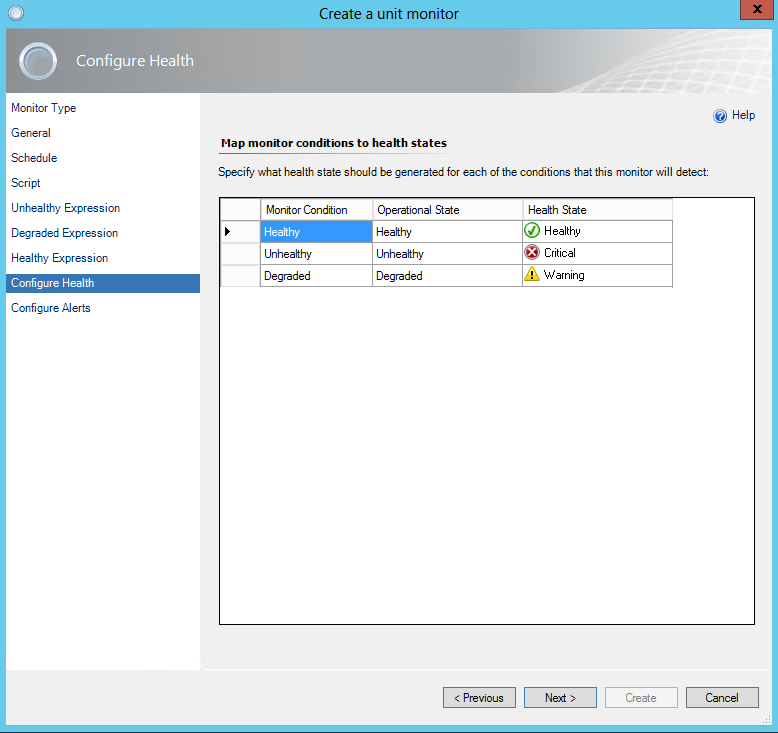
Take the following script and build a Time Script Three State Monitor (see below)

\\\\\\\\\\\\\\\\\\\\\\\\\\\\\\\\\\\\\\\\\\\\\\\\\\\\\\\\\\\\\\\\\\\\\\\\\\\\\\\\\\\\\\\\\\\\\\\\\\\
Option Explicit

Dim oAPI, oBag, oArgs
Dim objWMIService, objItem, colItems
Dim strComputer, strList
Dim memused, mempercent

Set oAPI = CreateObject("MOM.ScriptAPI")
Set oBag = oAPI.CreatePropertyBag()
Set oArgs = WScript.Arguments

On Error Resume Next

strComputer = "."

set objWMIService = GetObject("winmgmts:\\" _
& strComputer & "\root\cimv2")

set colItems = objWMIService.ExecQuery _
("Select * from Win32_OperatingSystem")
 

For Each objItem in colItems

memused = objItem.TotalVisibleMemorySize - objItem.FreePhysicalMemory
mempercent = memused/objItem.TotalVisibleMemorySize
mempercent = mempercent * 100
mempercent = Cint(mempercent)

Next

Call oBag.AddValue("Percent",mempercent)
Call oAPI.Return(oBag)
\\\\\\\\\\\\\\\\\\\\\\\\\\\\\\\\\\\\\\\\\\\\\\\\\\\\\\\\\\\\\\\\\\\\\\\\\\\\\\\\\\\\\\\\\\\\\\\\\\\

 
Best practice is to disable by default. Later you can set overrides for any monitor to enable it where applicable.

Be careful when setting your schedule. I have a fairly aggressive schedule here. This is a fairly light script but the cummulative of monitors can add up to impact performance.

Paste the script above into the script field. Set a file name with a .vbs extension.

Configure your preferred thresholds.


I'm setting a pretty generic override for 2008 Computer Group.


Friday, August 30, 2013

SCOM 2012 Percent Processor Time Report Blank

It's a bit of a cop out but the simple fix is to go get a different report. I've seen numerous posts about creating overrides, bringing in custom SSRS reports, etc. etc. In my case I'm running v.6.0.7026.0 of the core OS MP. For whatever reason I couldn't get that report to work. "Performance History (Percent Processor Time)" is always blank. I tried all the variations of overrides and temp rules to get Processor vs. Processor Information...it was a pain.

After chasing this for days I saw a post that suggested getting the latest reports. What I ened up with was a different MP entirely. I grabbed the "Windows Server Operating System Reports" 


This MP contains two reports. They are both able to display stats like CPU Average % Utilization, Memory Average % Physical Memory, and Logical Disk Average Disk Queue Length, and so on. I found the reports useful. This was a simple work around to get the stats I needed without having to correct Microsoft's blunder.


Thursday, April 5, 2012

HP StorageWorks MP for SCOM

Hopefully I'll have more successful info in the future...<coming soon>

I'm currently working on getting the HP StorageWorks Management Pack for SCOM going. The guide that comes with the download isn't bad. However, I still can't seem to get our P4000 series servers to populate. I've talked to HP several times and they're not even sure where to direct the question. I talked to a pretty knowledgeable guy on the P4000 team but he hasn't been able to find anyone just yet. I did successfully generate test traps from the P4000 CMC to SCOM. However, I really wanted to see the diagram view :(  I also added my P4000 nodes and clusters as network devices without any issues.

The other thing I'm trying to get working with it is our HP MSL4048 tape library. I added the network device which works fine. However, the actual alerts...no dice. I even went as far as building a new 2008R2 server with CommandView for Tape Libraries (since the management pack has a CommandView node). Still no love.

http://h18006.www1.hp.com/storage/SCOM_managementpack.html

fyi, local drives on our HP DL380s showed up right away so that was pretty cool. No special config was required.

I'm hoping getting a post out here will drum up some interest. Anyone having any luck? Same problems?

Update 4/10/2012
Working with HP support today. Trying to get to the SCOM MP team (teir 3). Sent over some bundle info from P4000 CMC. Also ran this utility to send them a ton of logs. Hopefully I'll have some answers soon.

http://update.external.hp.com/HPS/HPSreports/

Update 4/21/2012
I was at MMS this week and met the product manager for the HP StorageWorks management pack team. I explained the above about the P4000 diagram view. The tech with him laughs and says "yea I can't get it to work either". Sooo...I got the manager's business card. We'll see what turns up.


-Shep

Thursday, March 29, 2012

SCOM Groups Dyanmic Members OU Recursive

Recently I went looking for a good way to add a group of servers to system center operations manager a bit more dynamically. I came across this article which I found very handy.

http://contoso.se/blog/?p=170


However, the last thing he says is..."Please note that this will only include machines in the OU specified, it you want to include computers from another OU you can simple add a “OR” expression."

Seems tedious at right? So I started looking for how to do recursive OU membership adds in SCOM. I found a bunch of stuff siting how to use custom LDAP queries, PowerShell, custom management packs. bleh...

Here's what I came up with....

  1. Note the highest level OU for which you want to capture all sub-systems
  2. Go to one of the systems in SCOM and view the properties in "Monitoring". One of the values will be "Organizational Unit" > Copy it
  3. Create your Dynamic Members inclusion rule
  4.  Select "Windows Computer" > Add
  • Property = "Organizational Unit"
  • Operator = "Matches Wildcard"
  • Value = *< OU that you copied in step 2>
e.g.

*OU=XenApp-65,OU=Servers,DC=MYDOMAIN,DC=com

Works like a charm!

-Shep

Wednesday, December 7, 2011

Microsoft FEP 2010 Deployment Health Alert

I ran into this issue almost immediately after importing the management pack for Forefront Endpoint Protection 2010. Our FEP 2010 Deployment State was showing Critical. It turns out that the Microsoft documentation is incomplete on the subject. The issue we encountered was with the DB perms.


We needed to grant the account that FEP runs under some limited perms to the following databases. For us that was the Network Service acct.

  • Master
    • public
    • RSExecRole
  • msdb
    • public
    • RSExecRole
  • FEPDB_<site code>
    • db_AgentPermissions
    • db_SCCMDataExtractors
    • public
  • FEPDW_<site code>
    • db_AgentPermissions
    • db_OlapPermissions
    • db_ServicePermissions
    • public

This is just what the Microsoft support tech set the perms to. I can't vouch for all of it being completely necessary but it started working immediately for us.

I started with this which I would definitely recommend going through. Be sure to review that everything is done for pre-reqs before anything else. Perms, management packs, etc.

http://technet.microsoft.com/en-us/library/gg508724.aspx


One thing to note is that the FEP Date Warehouse state is really sort of redundant because the SQL pack would monitor it to (a recommended pre-req for FEP MP). Even so, I hate errors and wanted it fixed!

-Shep

Tuesday, December 6, 2011

OpsMgr Active Directory fSMORoleOwner Alerts


OK. To start off, I’d like to point out that this is WAY less complicated than it sounds. The actual change takes about 5 minutes. It was the research and planning that took ALL of the time. Anyway, here goes!

THE PROBLEM
We recently identified a problem through System Center Operations Manager 2007 R2 with our Active Directory environment. A while back we had to forcibly demote our primary domain controller for DNS, DHCP, and the fSMORoleOwner. As a result, when the new DCs were put in there were still traces of the old configuration.

This was the error that allowed us to identify the problem.

AD Replication Partner Op Master Consistency : The script 'AD Replication Partner Op Master Consistency' failed to execute the following LDAP query: '<LDAP://DC3.MYDOMAIN.com/CN=Configuration,DC=MYDOMAIN,DC=com>;(&(objectClass=crossRefContainer)(fSMORoleOwner=*));fSMORoleOwner;Subtree'. The error returned was 'The server is not operational.' (0x80040E37)

I found that the fSMORoleOwner in ForestDNSZones and DomainDNSZones were both different and neither were correct. It should have been set to DC1 but the ForestDNSZone showed DC2 (a current DC) and the DomainDNSZone showed OLD-DC1.

CHECKING YOUR SYSTEM
You’ll need the following to check this out. Add these to ADSI Edit…
1.       Configuration
2.       DC=DomainDNSZones,DC=MyDOMAIN,DC=COM
3.       DC=ForestDNSZones,DC= MyDOMAIN,DC=COM

After scouring the forums I found that the fix was to copy the settings from the distinguishedName attribute under Configuration in ADSI Edit for the correct fSMORoleOwner. I took that information and updated the owner attribute under DomainDNSZones and ForestDNSZones.


THE GOTCHAS
A couple of gotchas along the way…
1.      This must be done under on the actual infrastructure master.
2.      Formatting. This really is common sense but it got me. I read in several places to copy the distinguished name. However, that value is in a different format than the fSMORoleOwner property. Just be sure to grab a copy of the existing fSMORoleOwner value for two reasons.
a.       Copy the proper formatting
b.      Revert if there was some weird reason you’d need to (unlikely).
3.      For some reason this kept throwing me off. CN=Infrastructure is at the root of the Domain/ForestDNSZones. If you just expandeded that container you wouldn’t see it.

distingushedName example
CN= DC1,CN=Servers,CN=Site1,CN=Sites,CN=Configuration, DC=MyDOMAIN,DC=com

fSMORoleOwner example
CN=NTDS Settings,CN=DC1,CN=Servers,CN=Site1,CN=Sites,CN=Configuration,DC=MyDOMAIN,DC=com

So back to the forums for one last double check.


1.      Some people pointed to Anti-virus issues. In our environment this was NOT the issue. OpsMgr was right on the money.
2.      One thing that I had questioned but wasn’t necessary for us was a metadata cleanup. I would say it is definitely something anyone should do in this situation. However, we found that the metadata was actually removed properly. I point this out so people don’t assume the cleanup will fix the issue. It’s just good advice and best practice.
3.      There is a script “fixfsmo.vbs” that will do the same. I didn’t use it because it was just as easy to update it manually. The script is pretty basic. It checks the current, checks what it should be, updates if it doesn’t match.

CHECKLIST
Phase 1 - fSMO cleanup
1.       Perform AD Backup (system state and system drive) NTBACKUP.exe
2.       Turn off extra domain controller (if you have one available)
a.       This was a great idea my supervisor had. If anything when wrong we could make it look like this DC had the latest version of settings and replicate that back to the others.
b.      Update fSMORoleOwner in forestDNSZones and domainDNSZones
3.       TEST!
a.       Confirm logging in on all DCs works, VPN, etc. etc.
b.      If no issues, power on the extra DC.
4.       Validate replication using repadmin /replsum (I had to force the replication to the DC that was powered off)
5.       Confirm that OpsMgr errors go away

Phase 2 - DC metadata cleanup
  1. Repeat backup process
  2. Run cleanup utility
Scripted Method– pretty cool

Manual Method from command prompt
Ntdsutil.exe
Ntdsutil.exe: metadata cleanup
metadata cleanup: remove selected server <server name>
  1. Repeat testing
RESOURCES
Here were some other valuable resources I referenced along the way

Hopefully someone finds this helpful. I know it was painful for me assembling all of this information, planning testing. In the end there were no reboots required, no downtime, nothing like that. But there’s something to be said for the peace of mind after having all of the necessary information.

-Shep